# Keitaro 系统（伪装）

*什么是 Cloak、Keitaro（Hideclick）以及它如何工作？*

*关于 Keitaro 设置的详细文档。*

{% content-ref url="/spaces/q1yZupMNHzm1fxC9C8R1" %}
[Keitaro трекер](https://read.cryptograb.wiki/cryptograb-automatic-affiliate/cryptograb-automatic-affiliate/keitaro/)
{% endcontent-ref %}

*<mark style="color:蓝色;">**Cloak（克洛阿卡）**</mark> - 在流量套利或互联网营销的语境中，“克洛阿卡”一词用于表示一种向搜索引擎或套利网络隐瞒真实目标页面的方法，目的是欺骗变现系统以获取更多流量或收入。*

*在流量套利中，克洛阿卡是一种技术，看起来会创建一个合法或自然的目标页面，以符合搜索引擎或套利网络的要求。然而，当搜索引擎机器人或变现系统检查该页面时，它会自动重定向到另一个可能被禁止或违反规则的页面。*

*这种方法可用于规避限制、提高广告活动效率或为变现获取更多流量。但是，克洛阿卡是一种不正当的做法，可能导致负面后果，包括被搜索引擎或套利网络封禁或处罚。因此在互联网营销中使用克洛阿卡是不被推荐且不道德的。*

*<mark style="color:默认;background-color:green;">在我们的活动中，使用克洛阿卡是为绕过我们引导流量和投放广告的服务的审核。这有助于在工作初始几分钟内避免域名和账号被封禁，因为这些服务通常不喜欢“灰色”主题、套利和加密货币。</mark>*

***

*<mark style="color:蓝色;">**Keitaro（hideclick）**</mark>* - *是一个用于流量套利的平台，常用于联盟营销或提升转化率。它提供工具和功能，帮助您管理和跟踪广告活动并将流量变现。*

*Keitaro 的一项关键功能是 hideclick，它也是克洛阿卡的基础。Hideclick 可以防止由机器人或欺诈者产生的可疑点击，从而提高点击质量并提升转化率。*

*Keitaro 还提供其他功能，包括流量跟踪与分析、着陆页创建、重定向设置和分流测试，以便您优化广告活动并实现最佳效果。*

*总体而言，Keitaro（hideclick）帮助您管理并优化流量，提高广告活动的效率并增加收益。*

*<mark style="color:默认;background-color:green;">简而言之，在我们的项目中 Keitaro（Hideclick）用于将机器人流量重定向（转发）到</mark> <mark style="color:绿色;background-color:green;">**白页**</mark><mark style="color:默认;background-color:green;">（向审核显示的页面），而目标流量则到</mark>* *<mark style="color:默认;background-color:green;">**黑页**</mark><mark style="color:默认;background-color:green;">（我们想要投放广告的页面）</mark>*

***

## *连接 Keitaro*

*为了连接 <mark style="color:绿色;">**“克洛阿卡”**</mark> 在我们的项目中需要打开 “CryptoGrab\_Site”* [***机器人***](https://t.me/CryptoGrabSite_bot)\
*我的域名 --> 设置域名 --> 设置 Keitaro --> 启用/禁用 Keitaro*\
*example.com（我们想在其上安装克洛阿卡的域名） --> None（如果禁用）/ Keitaro（如果启用） -->（更换设计后）Default/crypto -->*✅<br>

<figure><img src="https://2154204851-files.gitbook.io/~/files/v0/b/gitbook-x-prod.appspot.com/o/spaces%2FMOGTRWPztth6SecTXZ0A%2Fuploads%2Fsa11MCzebp5BgP6EF7nw%2Fimage.png?alt=media&#x26;token=053837b5-b5a5-4a3a-993e-295e687d0d55" alt=""><figcaption><p><em><strong>在域名上安装 Keitaro</strong></em></p></figcaption></figure>

{% hint style="info" %}

### **激活克洛阿卡后必须重新安装设计，否则克洛阿卡不会被安装，您也无法访问其个人控制面板。**

{% endhint %}

***

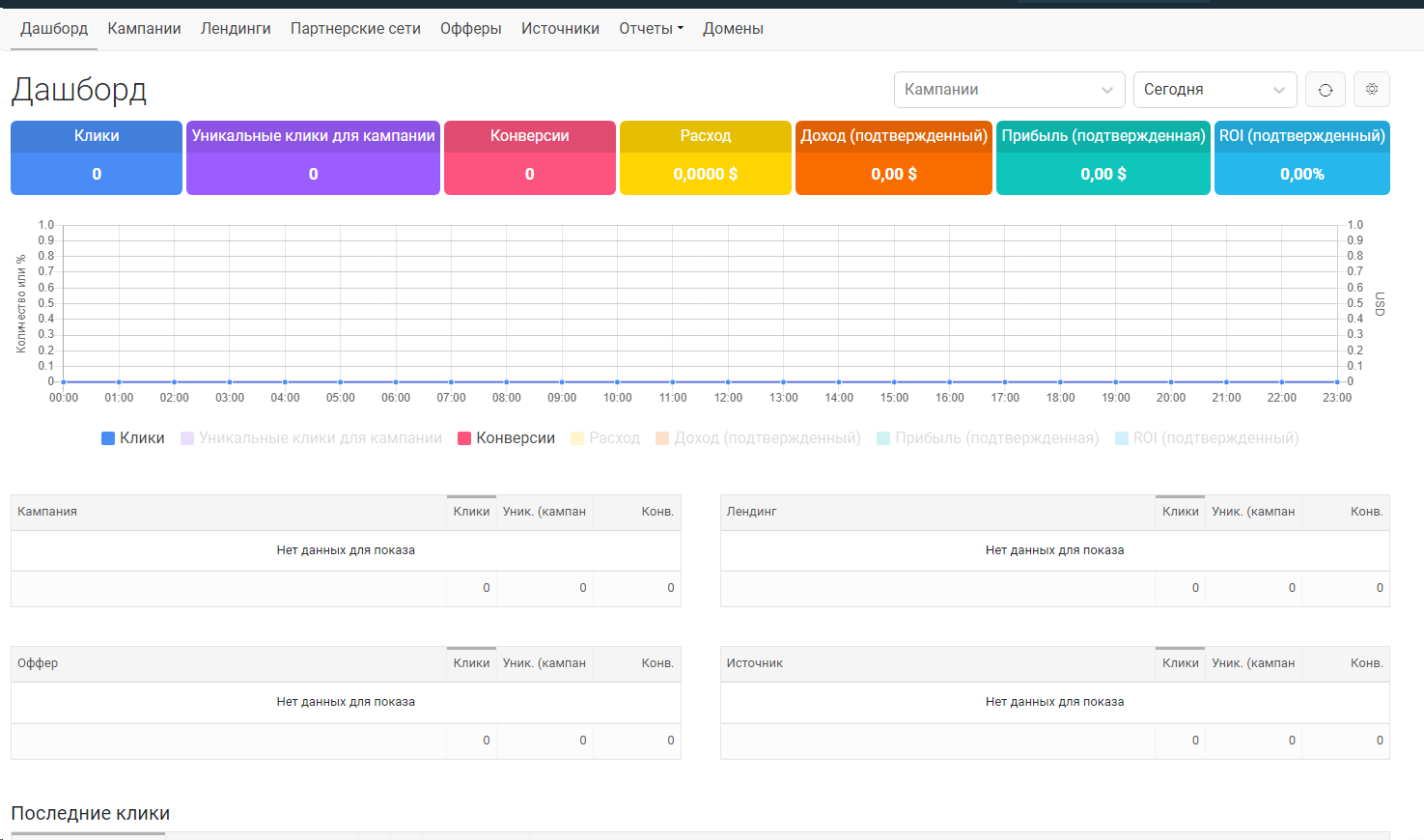
*完成这些步骤后，机器人会向您提供用于访问个人控制面板的数据，您可以在其中编辑设置 <mark style="color:绿色;">**克洛阿卡**</mark> 按照您的意愿*. <br>

<figure><img src="https://2154204851-files.gitbook.io/~/files/v0/b/gitbook-x-prod.appspot.com/o/spaces%2FMOGTRWPztth6SecTXZ0A%2Fuploads%2FxcWbcdpn22vzoFeX7WRZ%2FScreenshot_6.png?alt=media&#x26;token=2a0f8598-97fb-4480-ae4e-905f2b316beb" alt=""><figcaption><p><em><strong>Keitaro 数据示例展示</strong></em></p></figcaption></figure>

*在网站成功登录后，您可以查看点击、独立访客和转化的统计数据，以及它们的重定向情况。这些信息以图表形式呈现，便于直观跟踪和分析。*.

***

<figure><img src="/files/86827bb439fba006227d9a35cc0d36bbd0004fed" alt=""><figcaption><p>登录后的主页面</p></figcaption></figure>

在“公司”标签页中，您可以查看已安装克洛阿卡的域名列表，并为每个域名单独获取统计数据（点击/转化）。这使您能够详细跟踪和分析每个域名的表现。<br>

<figure><img src="https://2154204851-files.gitbook.io/~/files/v0/b/gitbook-x-prod.appspot.com/o/spaces%2FMOGTRWPztth6SecTXZ0A%2Fuploads%2F26yaouF6Nzv9vMgM7sLB%2Fimage.png?alt=media&#x26;token=48eac079-07e4-463d-aa56-82b340d46642" alt=""><figcaption><p><em><strong>公司标签页</strong></em></p></figcaption></figure>

我们工作中需要的主要标签是“公司”。在这里我们可以编辑域名并根据需要设置过滤。点击域名后，您将进入下一步，可以对该域名进行更详细的设置。<br>

<figure><img src="https://2154204851-files.gitbook.io/~/files/v0/b/gitbook-x-prod.appspot.com/o/spaces%2FMOGTRWPztth6SecTXZ0A%2Fuploads%2F09wQO2MzdRG2rjtsnuK4%2Fimage.png?alt=media&#x26;token=a1433a34-2815-4d49-b3b2-a975396d7813" alt=""><figcaption><p><em><strong>域名详细设置页面</strong></em></p></figcaption></figure>

在此部分，您可以在必要时设置跟踪器，并设置您的“白页”（通过直接链接使用自定义设计或允许默认禁用的 VPN 点击）。您可以跟踪唯一点击量和已被过滤的机器人点击。除了“白页”，您还可以为特定国家/地区设置“黑页”。

{% hint style="info" %}

## 有关此类克洛阿卡的更多详细信息，建议参考 [Keitaro 的文档。](https://docs.keitaro.io/ru/campaigns-and-streams/filtering.html) 在那里您可以更详细地了解此类克洛阿卡的特性和功能

{% endhint %}

## &#x20;详细文档

<https://read.cryptograb.io/keitaro/>


---

# Agent Instructions: Querying This Documentation

If you need additional information that is not directly available in this page, you can query the documentation dynamically by asking a question.

Perform an HTTP GET request on the current page URL with the `ask` query parameter:

```
GET https://read.cryptograb.wiki/cryptograb-automatic-affiliate/zh-guide/cryptograb-wei-ji/ji-qi-ren-cgcontrolbot/keitaro-xi-tong-wei-zhuang.md?ask=<question>
```

The question should be specific, self-contained, and written in natural language.
The response will contain a direct answer to the question and relevant excerpts and sources from the documentation.

Use this mechanism when the answer is not explicitly present in the current page, you need clarification or additional context, or you want to retrieve related documentation sections.