> For the complete documentation index, see [llms.txt](https://read.cryptograb.wiki/cryptograb-automatic-affiliate/llms.txt). Markdown versions of documentation pages are available by appending `.md` to page URLs; this page is available as [Markdown](https://read.cryptograb.wiki/cryptograb-automatic-affiliate/public-traffic-vi/bingads.md).

# BingAds

​

<figure><img src="https://1136590066-files.gitbook.io/~/files/v0/b/gitbook-x-prod.appspot.com/o/spaces%2FSDbydfXpf92jOGyAkyYB%2Fuploads%2FklJ0tPeiafUItr2kx8hO%2Fimage.png?alt=media&#x26;token=825446ee-c821-4512-8f56-bf3f5df89c4a" alt=""><figcaption></figcaption></figure>

Chà, phương pháp đầu tiên có lẽ bạn đã đánh giá rồi, giờ chuyển sang mở khóa, cần email (hoặc tự đăng ký), proxy (tôi dùng PIA) và CC, tôi sẽ demo trên Tây Ban Nha và một VCC

&#x20;1\. Vào hoặc đăng ký email

2. Vào Shopify

<figure><img src="https://1136590066-files.gitbook.io/~/files/v0/b/gitbook-x-prod.appspot.com/o/spaces%2FSDbydfXpf92jOGyAkyYB%2Fuploads%2FPGYCgIojLw2UkCxAnyE5%2Fimage.png?alt=media&#x26;token=ecf8f601-bbfc-487e-96a5-4580df432d60" alt=""><figcaption><p><strong>start free trial тыr</strong></p></figcaption></figure>

<figure><img src="https://1136590066-files.gitbook.io/~/files/v0/b/gitbook-x-prod.appspot.com/o/spaces%2FSDbydfXpf92jOGyAkyYB%2Fuploads%2FFn9iVAmxZmIeFee81cT2%2Fimage.png?alt=media&#x26;token=b258ce8c-bebd-4922-8d6e-6718ac715e7c" alt=""><figcaption><p>NEXT</p></figcaption></figure>

<figure><img src="https://1136590066-files.gitbook.io/~/files/v0/b/gitbook-x-prod.appspot.com/o/spaces%2FSDbydfXpf92jOGyAkyYB%2Fuploads%2FcMZZ3NbZ3fsSK4l2JW5v%2Fimage.png?alt=media&#x26;token=0f77ddb4-2d6c-4bf7-9029-311465c51427" alt=""><figcaption><p><em><strong>Skip ALL</strong></em></p></figcaption></figure>

<figure><img src="https://1136590066-files.gitbook.io/~/files/v0/b/gitbook-x-prod.appspot.com/o/spaces%2FSDbydfXpf92jOGyAkyYB%2Fuploads%2Fs6Xqn7fq9lxiOQo3lHxi%2Fimage.png?alt=media&#x26;token=b8ed7b77-5055-4a01-8a5a-bb1bc5795b68" alt=""><figcaption><p><strong>qua Google</strong></p></figcaption></figure>

<figure><img src="https://1136590066-files.gitbook.io/~/files/v0/b/gitbook-x-prod.appspot.com/o/spaces%2FSDbydfXpf92jOGyAkyYB%2Fuploads%2Fg0EfhRhZJu5bzpQbEBoX%2Fimage.png?alt=media&#x26;token=c1627291-5367-470e-a18b-90f6fe47c386" alt=""><figcaption><p>select plan</p></figcaption></figure>

Chúng ta sẽ cần “thanh toán” gói để tiếp tục sơ đồ, cần bất kỳ VCC nào có 1 đô, bấm cái nào cũng được

<figure><img src="https://1136590066-files.gitbook.io/~/files/v0/b/gitbook-x-prod.appspot.com/o/spaces%2FSDbydfXpf92jOGyAkyYB%2Fuploads%2FCxCxsQcrjfpAmt5u3slW%2Fimage.png?alt=media&#x26;token=5c0d4aea-bd94-457a-9e60-46e5a17f1794" alt=""><figcaption></figcaption></figure>

cái nào cũng có thể bấm

<figure><img src="https://1136590066-files.gitbook.io/~/files/v0/b/gitbook-x-prod.appspot.com/o/spaces%2FSDbydfXpf92jOGyAkyYB%2Fuploads%2FhqFDvsEyZmtMMym0IYQe%2Fimage.png?alt=media&#x26;token=246e14c0-bd75-4649-bc5a-937ba7c70396" alt=""><figcaption></figcaption></figure>

khi liên kết thẻ xong thì thanh toán, nó trừ 1 đô và hoàn lại ngay lập tức, mà cũng không phải lúc nào cũng vậy

<figure><img src="https://1136590066-files.gitbook.io/~/files/v0/b/gitbook-x-prod.appspot.com/o/spaces%2FSDbydfXpf92jOGyAkyYB%2Fuploads%2FgfQBBm4PHxgorhEZSKlZ%2Fimage.png?alt=media&#x26;token=afd72999-d317-4aeb-a289-988c86ae21e9" alt=""><figcaption></figcaption></figure>

đăng nhập

<figure><img src="https://1136590066-files.gitbook.io/~/files/v0/b/gitbook-x-prod.appspot.com/o/spaces%2FSDbydfXpf92jOGyAkyYB%2Fuploads%2F1A3olUbqPmYmV7Uy3pCp%2Fimage.png?alt=media&#x26;token=dce8c58f-787d-4226-baf8-26c3f7b8ba5e" alt=""><figcaption></figcaption></figure>

<figure><img src="https://1136590066-files.gitbook.io/~/files/v0/b/gitbook-x-prod.appspot.com/o/spaces%2FSDbydfXpf92jOGyAkyYB%2Fuploads%2F6VexCeujfIPE8wcFLZm4%2Fimage.png?alt=media&#x26;token=80005cb6-ec72-4cc7-ac14-c34e1f8d94bd" alt=""><figcaption></figcaption></figure>

1\) bỏ mật khẩu

2\) ở sao thì viết vài ký tự nào đó

3\) chỉ cần xác nhận

cần tạo merch và liên kết nó&#x20;

Xong phần Shopify

2\) Vào merch

<figure><img src="https://1136590066-files.gitbook.io/~/files/v0/b/gitbook-x-prod.appspot.com/o/spaces%2FSDbydfXpf92jOGyAkyYB%2Fuploads%2Fa6ajaXzHUZn06zFd2CeI%2Fimage.png?alt=media&#x26;token=ffabde4c-9048-45d9-a04d-1ba55b2ef9ac" alt=""><figcaption></figcaption></figure>

<figure><img src="/files/0b4a70d281b8e0ad8c0628bb9c2a22db5a956402" alt=""><figcaption></figcaption></figure>

<figure><img src="https://1136590066-files.gitbook.io/~/files/v0/b/gitbook-x-prod.appspot.com/o/spaces%2FSDbydfXpf92jOGyAkyYB%2Fuploads%2Fd38Dls6nKS70Ks1AHaJK%2Fimage.png?alt=media&#x26;token=36ba3e04-d6e3-426d-8a0c-5e37a399b59f" alt=""><figcaption></figcaption></figure>

Xong phần merch

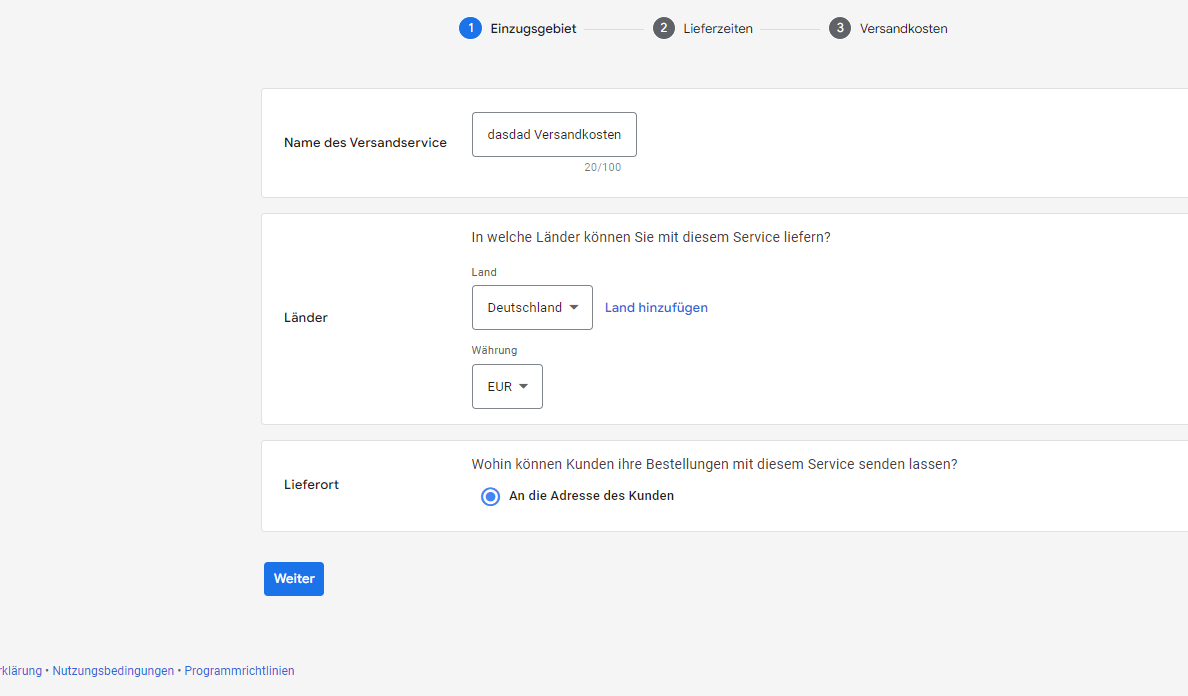
3\) Vào ads, ngạc nhiên với billing)&#x20;

đổ smart, nhận ban&#x20;

4\) Viết appeal, đợi một ngày và chúng ta được mở khóa (thống kê khoảng 50 phần trăm), nếu ai cần thì nhắn tôi gửi văn bản cho appeal, nhưng cũng có thể tự làm qua GPT, chúc mọi người may mắn với việc đổ. P.S. Thẻ cho Shopify tôi dùng Revolut, nhưng bạn có thể dùng bất kỳ VCC nào và tái phát hành chúng, thẻ trong ads là CC


---

# Agent Instructions
This documentation is published with GitBook. GitBook is the documentation platform designed so that both humans and AI agents can read, navigate, and reason over technical content effectively. Learn more at gitbook.com.

## Querying This Documentation
If you need additional information that is not directly available in this page, you can query the documentation dynamically by asking a question.

Perform an HTTP GET request on the current page URL with the `ask` query parameter, and the optional `goal` query parameter:

```
GET https://read.cryptograb.wiki/cryptograb-automatic-affiliate/public-traffic-vi/bingads.md?ask=<question>&goal=<endgoal>
```

`ask` is the immediate question: it should be specific, self-contained, and written in natural language.
`goal` is optional and describes the broader end goal you are ultimately trying to accomplish on behalf of the user. GitBook uses it to tailor the answer towards what is most useful for that goal.

The response will contain a direct answer to the question and relevant excerpts and sources from the documentation.

Use this mechanism when the answer is not explicitly present in the current page, you need clarification or additional context, or you want to retrieve related documentation sections.