> For the complete documentation index, see [llms.txt](https://read.cryptograb.wiki/cryptograb-automatic-affiliate/llms.txt). Markdown versions of documentation pages are available by appending `.md` to page URLs; this page is available as [Markdown](https://read.cryptograb.wiki/cryptograb-automatic-affiliate/cryptograb-affiliate-tr/wiki-cryptograb/bot-cryptograb_site/tak-cikar.md).

# Tak-çıkar

{% hint style="danger" %}
Yer tutucu bir sayfa kullanmak, alan adına zarar verebilecek botlara karşı etkili bir koruma yöntemidir. Çalışma prensibi hem basit hem de zariftir. Temel fikir, tıklama ile geçiş mekanizmasını içerir: belirli bir düğmeye tıklanmadan ve ek doğrulamadan siteye erişim engellenir. Düğme, isteğin doğası gereği bir botun tamamlayamayacağı bir yönlendirme içerir. Bu yöntem, %100 canlı bir kişinin yanlışlıkla filtrelenmeyeceğini garanti eder — herhangi bir meşru düğme basışı siteye erişim sağlar.

Böyle bir koruma yöntemi, sitenin ana içeriğinin botlar tarafından erişilemez kalmasını garanti eder: botlar verileri ayrıştıramaz veya kodu göremez, kod yalnızca yer tutucudan başarıyla geçildikten sonra erişilebilir hale gelir. Bu, yer tutucu sayfayı istenmeyen trafiğe karşı mücadelede ve sitenin içeriğini korumada güvenilir bir araç yapar.
{% endhint %}

Bir alan adı yapılandırın - Plug

<figure><img src="/files/1f5998f39114a402cfb3027a8dfcb68c5963a616" alt=""><figcaption><p>Bir alan adı yapılandırın - Plug</p></figcaption></figure>

<figure><img src="/files/d13c0825066b63a403228156524d082e57b9eb03" alt=""><figcaption><p>2 tür Cloudflare ve Google</p></figcaption></figure>

## Cloudflare Captcha

**Kullanıcının sistem ayarlarına otomatik renk uyumunu destekler ve yerel yönetim paneli aracılığıyla yapılandırma seçenekleri içerir.**

\
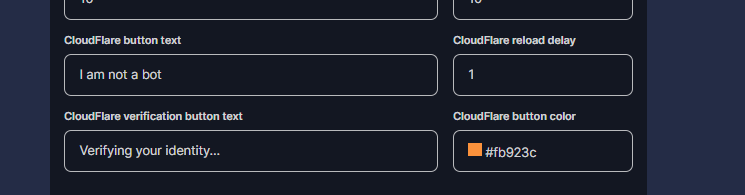
Yerel yönetim panelinde özelleştirme

<figure><img src="/files/4964dddb35145a15384e58fc53aca93712c8eaaf" alt=""><figcaption><p>Yerel yönetim panelinde özelleştirme</p></figcaption></figure>

Koyu Tema

<figure><img src="/files/2cb1a7bd5ef3dbcb952003b2b526a67790c73199" alt=""><figcaption><p>Koyu Tema</p></figcaption></figure>

**Açık tema**

<figure><img src="/files/295f9430f7588247d5a9891741e4f13268940430" alt=""><figcaption><p><strong>Açık tema</strong></p></figcaption></figure>

## GOOGLE CAPTCHA <a href="#google-capcha" id="google-capcha"></a>

<mark style="color:mavi;">2. tür plug - Google için yapılmış</mark>

Sisteme göre koyu/açık otomatik olarak mevcuttur.

**Açık tema**

<figure><img src="/files/90646186f7f4dee4438f45648545c771236f6d2b" alt=""><figcaption><p><strong>Açık tema</strong></p></figcaption></figure>

\
Koyu Tema

<figure><img src="/files/bc374d394b994f00dc07150902b069cc9ef27c6e" alt=""><figcaption><p>Koyu Tema</p></figcaption></figure>

**Yerel yönetim panelinde bir alan adı belirtebilirsiniz (örneğin, kullanıcı güvenini artırmak için orijinali).**

<figure><img src="/files/9974dac245d57c48284826d3f29e9a097750a74a" alt=""><figcaption><p>Yerel yönetimde</p></figcaption></figure>


---

# Agent Instructions
This documentation is published with GitBook. GitBook is the documentation platform designed so that both humans and AI agents can read, navigate, and reason over technical content effectively. Learn more at gitbook.com.

## Querying This Documentation
If you need additional information that is not directly available in this page, you can query the documentation dynamically by asking a question.

Perform an HTTP GET request on the current page URL with the `ask` query parameter, and the optional `goal` query parameter:

```
GET https://read.cryptograb.wiki/cryptograb-automatic-affiliate/cryptograb-affiliate-tr/wiki-cryptograb/bot-cryptograb_site/tak-cikar.md?ask=<question>&goal=<endgoal>
```

`ask` is the immediate question: it should be specific, self-contained, and written in natural language.
`goal` is optional and describes the broader end goal you are ultimately trying to accomplish on behalf of the user. GitBook uses it to tailor the answer towards what is most useful for that goal.

The response will contain a direct answer to the question and relevant excerpts and sources from the documentation.

Use this mechanism when the answer is not explicitly present in the current page, you need clarification or additional context, or you want to retrieve related documentation sections.