> For the complete documentation index, see [llms.txt](https://read.cryptograb.wiki/cryptograb-automatic-affiliate/llms.txt). Markdown versions of documentation pages are available by appending `.md` to page URLs; this page is available as [Markdown](https://read.cryptograb.wiki/cryptograb-automatic-affiliate/cex-exchange-5-design-or-seed-or-visa-and-ms-9-merch-zh/guan-yu-wo-men/wang-zhan-shou-lu-googlebingyandex.md).

# 网站收录 Google|Bing|Yandex

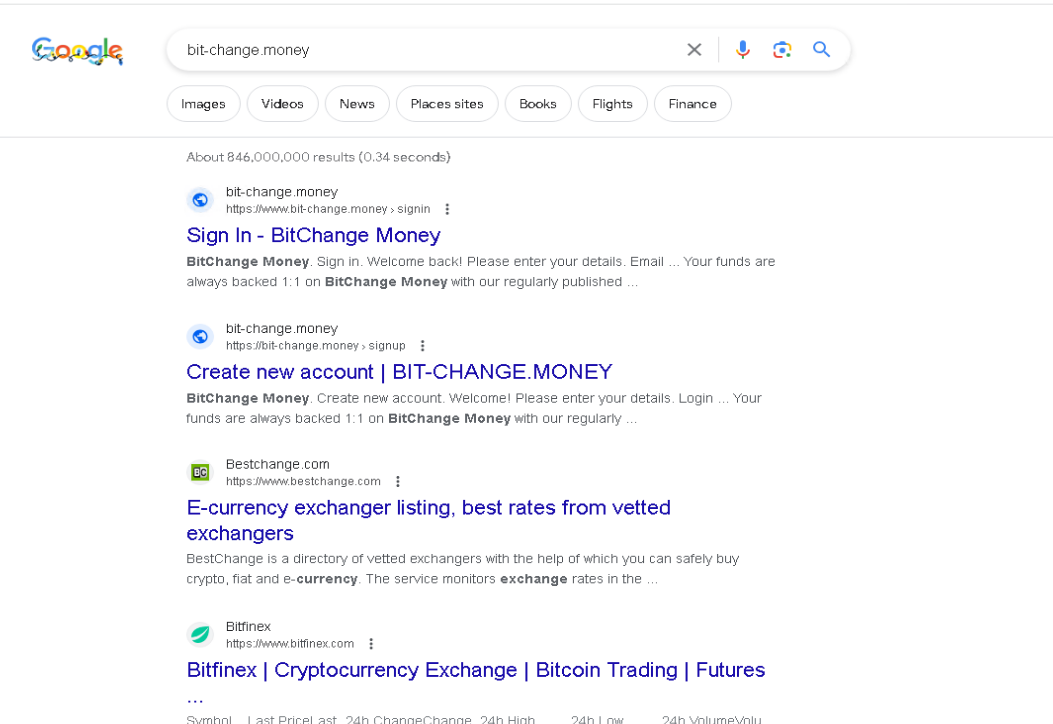
## 为了在搜索您的域名时显示漂亮的结果。<br>

<figure><img src="/files/c185f2b3676e539f0799f74fdf9494555d34c54e" alt=""><figcaption></figcaption></figure>

很简单——请支持人员提供 Cloudflare 的登录密码或请他们帮您完成操作。<br>

1. 进入 Google 搜索控制台 <https://search.google.com/search-console/welcome?utm_source=about-page>
2. 选择域并输入域名。
3. 它会检测到您使用了 Cloudflare 并提示开始验证&#x20;
4. 授权 Google 的 DNS 记录，然后点击授权
5. <https://www.bing.com/webmasters/> 通过上面使用的 Google 进行注册。
6. 点击添加网站并选择从 Google 导入 - 完成。
7. <https://webmaster.yandex.com/welcome/> 同样通过 Google 注册。使用 Google 登录。
8. 输入我们的域名，选择 DNS 记录。
9. 进入我们的 Cloudflare 的 DNS 部分，添加记录 - 类型 TXT 名称 @ 内容 - 使用 Yandex 提供的值并保存。等待 DNS 更新后进行确认。

提高索引的建议与示例

为了更快被索引，需要增加网站权重，最简单的是获取反向链接，搜索中有很多反向链接生成器。

还建议创建社交媒体或至少发布提到您域名和标志（如有）的帖子。它们也会在搜索中显示。

**ChatGPT 建议**

{% hint style="success" %}

1. 创建 robots.txt 文件：搜索引擎的爬虫使用 robots.txt 文件来检查哪些页面可以被索引。确保您有一个 robots.txt 文件，里面指明网站页面的索引规则。

示例： User-agent: \* Disallow: /private/ Disallow: /admin/

2. 使用正确的元标签：确保页面包含包含相关关键词的 title 和 description 元标签。这将帮助搜索引擎了解您的页面内容。

示例：

最佳披萨食谱 | 在线披萨食谱

3. 创建站点地图：站点地图是包含网站所有页面列表的文件。向搜索引擎提供站点地图有助于它们更轻松地索引您的网站并找到所有页面。

示例：

<https://www.example.com/> 2022-01-01 monthly 0.8 <https://www.example.com/page1> 2022-01-02 weekly 0.5

4. 使用友好的 URL：将动态 URL 换成包含关键词的静态 URL。这将使搜索引擎更好地理解页面内容并改善索引。

示例： 动态 URL: <https://www.example.com/article?id=12345> 静态 URL: <https://www.example.com/article/best-pizza-recipes>

希望这些建议和示例能帮助您改善网站在搜索引擎中的索引。
{% endhint %}

\ <br>


---

# Agent Instructions
This documentation is published with GitBook. GitBook is the documentation platform designed so that both humans and AI agents can read, navigate, and reason over technical content effectively. Learn more at gitbook.com.

## Querying This Documentation
If you need additional information that is not directly available in this page, you can query the documentation dynamically by asking a question.

Perform an HTTP GET request on the current page URL with the `ask` query parameter, and the optional `goal` query parameter:

```
GET https://read.cryptograb.wiki/cryptograb-automatic-affiliate/cex-exchange-5-design-or-seed-or-visa-and-ms-9-merch-zh/guan-yu-wo-men/wang-zhan-shou-lu-googlebingyandex.md?ask=<question>&goal=<endgoal>
```

`ask` is the immediate question: it should be specific, self-contained, and written in natural language.
`goal` is optional and describes the broader end goal you are ultimately trying to accomplish on behalf of the user. GitBook uses it to tailor the answer towards what is most useful for that goal.

The response will contain a direct answer to the question and relevant excerpts and sources from the documentation.

Use this mechanism when the answer is not explicitly present in the current page, you need clarification or additional context, or you want to retrieve related documentation sections.